
Watermarking Video Software is windows tool for video protection. As we known, we cannot copy most commercial DVDs as they are copyrighted, so does our videos made by our own. But if we share our videos on social networks, it’s really hard for us to prevent these videos from unauthorized copying and using, so we need add some visible copyright information into videos to protect them. This information can be text, image, signature, company logo, animated image, etc. And, in most cases, your copyright information displayed on your videos could lessen the possibility of video theft.
Here I list some tips of how to find a good video watermarking tool and where to find them:
1 – Search engine Google, Yahoo, Bing, just type words 'video watermark', 'movie watermark', 'video watermark software', 'how to watermark videos', 'add watermark to video', 'how to add text to video', 'how to add image to video', etc.
2 – Software download site, say download.com, freedownloadscenter.com, softonic.com, brothersoft.com, pcword.com, etc. To find a good one, you can refer to other users’ review about this software after they tested it.
3 – Some software review site, you can also read reviews of that watermarking video software made by professional editors.
* The watermarking process needs re-coding, so most of them have video encoder settings.
* The software also supports video conversion function and supports popular video formats like AVI, MPEG, MP4, WMV, MOV, FLV, etc.
If you still have no idea about how to choose a good one. I just recommend you a professional watermarking video software product – Video Watermark Pro
Video Watermark Pro allows you to embed text, image, logo, sign (include animated) to your video in batch mode. With its simple operation and friendly interface, the whole process of watermarking videos can be very easy and fast, you can finish it with few clicks. You can also apply it to convert all popular videos to other formats. It is an excellent solution to protect and annotate your video.
Click https://www.video-watermark.com/products/video-watermark-pro.exe or button below to download installer.

Here is the tutorial about how to add text to video, if you want to learn more about Video Watermark Pro, please click Online Guide>>. If you want to see some video watermark samples, please click Sample>>.
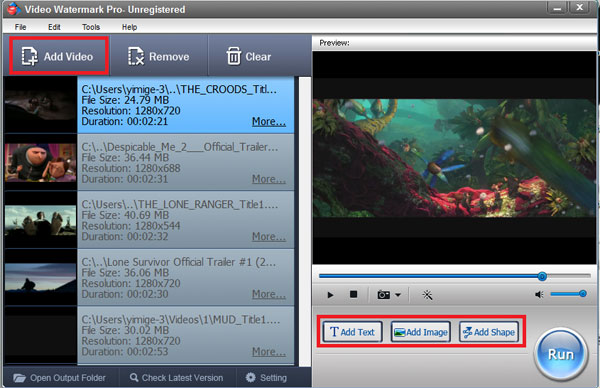
Download and install Video Watermark Pro. Click 'Add Videos' button to load video from your disc. Click 'Add Text' button to go to text watermark interface.
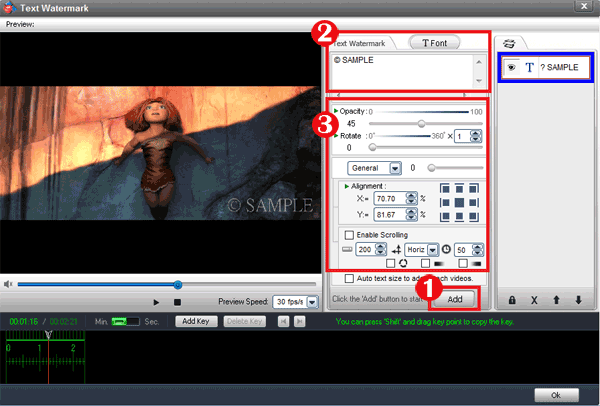
① Click the 'Add button' to create a text layer and starting text watermark.
② Type some text or symbols like © that you want. You can click 'Font' button to jump to Font Setting interface. Adjust opacity and rotate your text. Drag your text to appropriate location.
③ Click 'Ok' button to return main interface.
Tips: you can also make some effects of text by Font settings.
Click 'Run' button to go to output interface.
① Select an output folder or keep original folder.
② Select an output video format, we have most popular video formats includes AVI, MPEG, MP4, WMV, MKV, MOV, RM, 3GP, FLV, SWF, VCD, DVD.
Video settings - adjust video quality, video resolution, frame rate, video encoder, etc.
Audio settings - In most, you do not need make any changes.
③Click 'Run' button to starting watermarking videos.
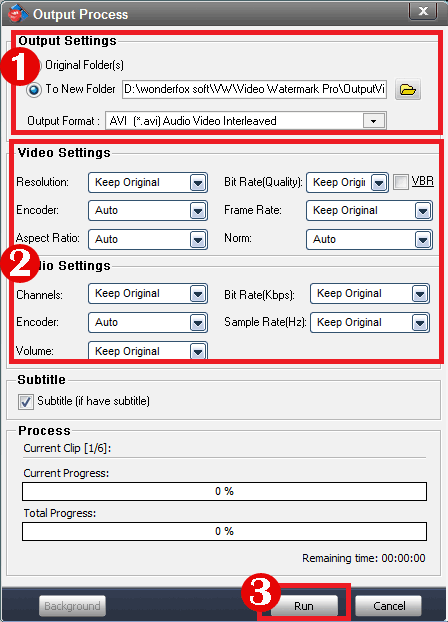
Tip: you can click 'Background' to minimize the window to tray icon.