
Collecting all video watermark removal tutorials, it brings you the feasible ways to remove logo or time stamps or other video watermarks in short time.
Video watermark is a copyright symbol, like Youtube watermark protecting video from unauthorized copies. While there are times that we'd like to retouch the copyrighted ones simply by removing watermark from video. Then the rest parts can guide you and tell about how to delete watermark.
Please be alter: Never remove watermark videofor business without permissions, which don't belong to you. Also never keep these videos for your personal use without authorization. Or you will face charge of copyright infringmentsand undertake legal responsibility for it.
Instead of deleting watermark or logo entirely, blurring can make watermark disappear more naturally and much less obviously.


If the watermark conveys some messages that you don't want viewers to see, or wanting to add new logo, you can choose replacing the old watermark with a new one to remove logo from video.


If the watermark is in the corner, small and tight, you can crop this area to remove video watermark. Finally, you will loss a part of the screen, but the video keeps clean and original at best.


In this part, we explain how to remove watermark from video in details by applying these methods in watermark video remover:
Download address: https://www.video-watermark.com/products/video-watermark.exe
First, download and install video watermark remover - Video Watermark Pro to prepare.
Or click the button below:

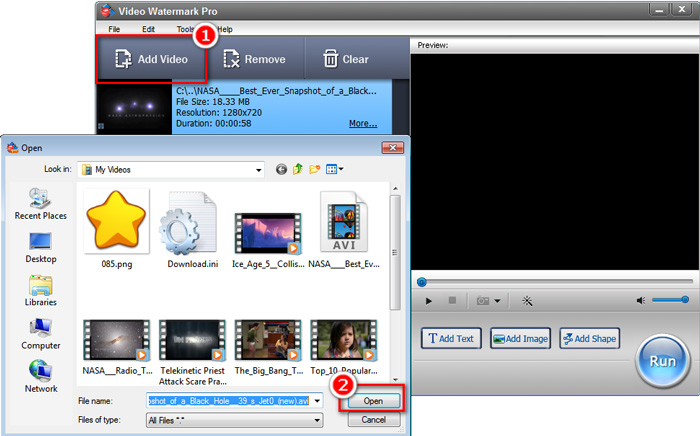
Step 1, Launch Video Watermark and load your video needs to remove watermark by clicking "Add Video" to import them.
Step 2, Click "Add Image". Then it will alert a new window to load image watermark. Then click "Browse">"Load Watermark" to select your new logo watermark accordingly(supporting any format, including animated GIF), then "OK" and select the watermark and click "Add".
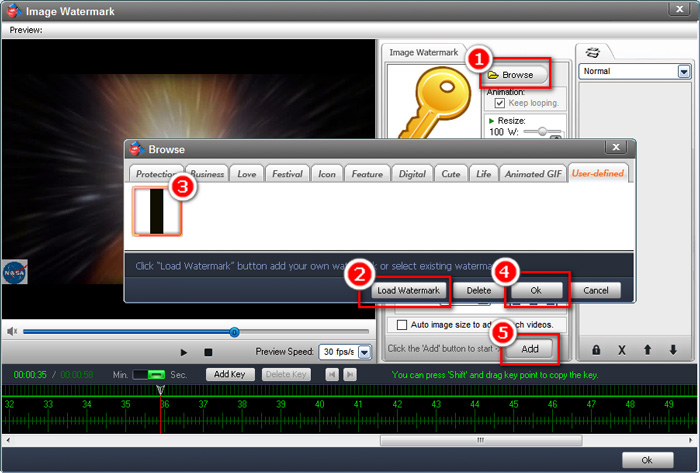
Specifically in photo filtering:
If choosing blurring original watermark, you will need to load a blur photo in this step.
If using replacing watermark, you can just load your new watermark image or watermark logo.
Or you prefer cropping watermark, merely load a black bar to overlap original watermark.
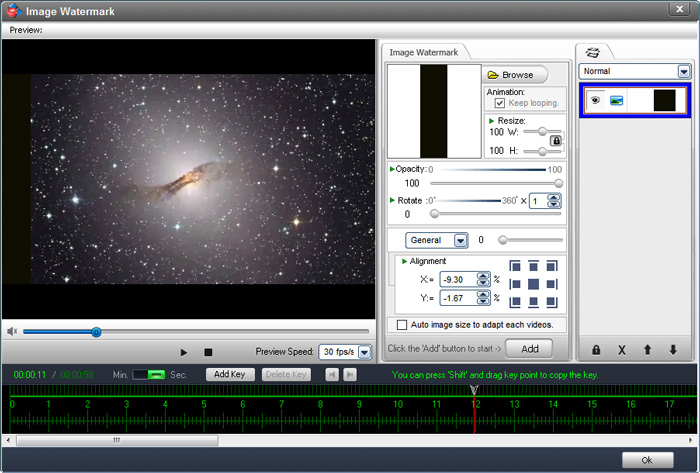
Tips:It also supports resizing new watermark to completely mask the original one.
After everything settled, click "OK".
Step 3, Click "Run" button. Lots of video output options will be alerted for your choices. In most cases, if you have no particular requirements, just use the default parameters and click "Run".
If confused, please reach to us at support@video-watermark.com for help.