
Needs as below:
1. Run in windows operating system
2. Video Watermark Pro 5 – click to download it >>

3. Logo or copyright info that you want to put on your video.
We will use image watermark below as an example.

Step 1 Install Video Watermark Pro and Add Videos
After Video Watermark Pro has been downloaded, install it on your computer.
Launch it; you will come to the main interface of Video Watermark Pro.
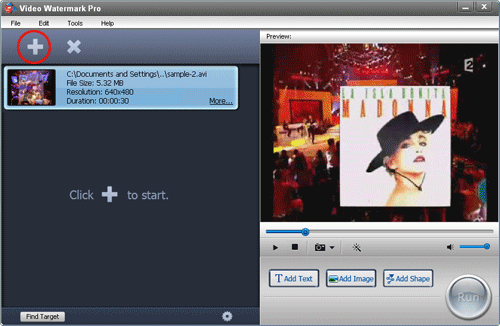
On the main interface, click "Add Video" button to load your video to list. The program supports batch mode, so you can load more videos and watermark them at one go.
Step 2 Add and Customize Image Watermark
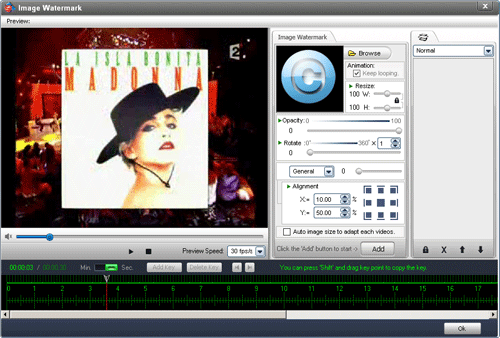
Click "Add Image" button to jump to image watermark editing interface, (you can also add text/shape to video).
On image watermark editing interface, click "Add" button to create a new layer where you can edit your image watermark.
2-1. Load image/logo you want
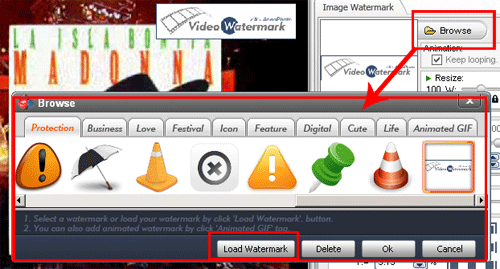
Click "browse" button to image watermark material library. Here lots of watermark materials (include animated watermark) are provided, you can select one from watermarks provided or load your own image/logo by hitting "Load Watermark" button. After watermark has been loaded, it will display on the preview window.
2-2. Edit and Customize Your Image Watermark
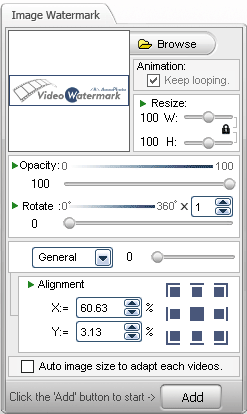
Video Watermark Pro allows user to edit more on image watermark, such as resizing, changing opacity, rotating, adjusting its position, etc. Here we just change its opacity and position.
Tips: If you want to watermark multi-video at once, please tick the option of "Auto Image Size To Adapt Each Video".
Step 3 Timeline Editing for Advanced User (Optional)
Video Watermark Pro provides powerful timeline feature. With this feature, you can control appearing time and disappearing time of watermark, and create dynamic effect you like. Please keep reading to learn more about it.
3-1 Click green button to zoom timeline in. (Min. to Sec.)

3-2 Click "Add key" to create key point, you can make watermark dynamic with two key point, such as set key 1 to 0 degree, and set key 2 to 360 degrees, and then preview, you will see the rotation animation. Ok, here I will create rich animation by create 5 key point.
This video is a 30-second video, the 5 key point will be placed on 0 second - 7 seconds - 15 seconds - 22 seconds - 30 seconds.

Select key 1 - set opacity to 0%.
Select Key 2 - set opacity to 100% and move the watermark to center.
Select Key 3 - set opacity to 20% and rotate 360% * 6.
Select Key 4 - set opacity to 60%, move it to left and resize the watermark.
Select Key 5 - set opacity to 10%, rotate 360% * 5 and resize.
Video Watermark Pro allows user to have a free trial. Click button below to download its free trial. If you think this software is useful and want to get its full version, please purchase a license with $34.95 (50% OFF, original price 69.95). We provide 30 day money back guarantee, if you do not satisfy with this software, you can get your money back easily.