
Q: I am movie amateur, I like cutting wonderful part of movie and upload these clips to YouTube, Myspace, FaceBook, etc. Such as robot fighting of Transformers3, mermaid part of Pirates of the Caribbean4. My movie clips are very popular, have 3000 visitors from YouTube per day. So I think about creating my own movie clip sharing website, and get visitors from those big video sharing web. The only way is adding my domain name on movie clips, people will seeing the domain name and visit my web via it. But I wonder if it is possible to add text to movie?
A: The answer is absolutely yes! You can directly add your domain to movie and cut movie at once by using Video Watermark Pro.
The advantages of adding text to movie clip is obvious as the question mentioned above, text info on movie clip will show your web, product, brand and name to every visitors, it will bring direct or indirect profit for you without paying fees. In addition, add text to movie is also a good way for video tutorial, you can add graphics and text to complete your video tutorial.
First of all your movie clip must be attractive or have distinctive features, such as UFO, ET, news of super star, funny video, etc. because you need people be interested in your videos, it is very important. When your movie clips have many visitors, you can add text to your videos which you want to show, and this text must be nature. When people see your movie clips, they will also see your text info on videos, part of people will have interest in your web via text info.
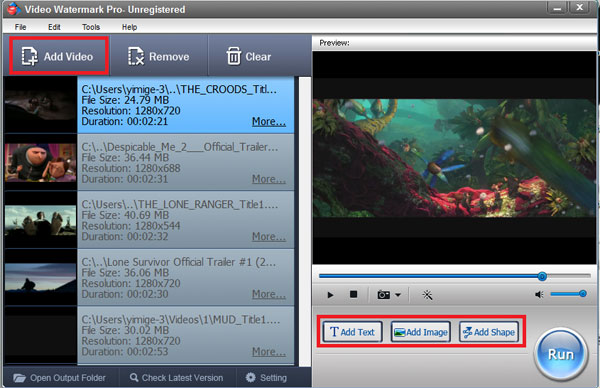
Firstly download and install the video watermark software to your PC. Launch, load your original video(s) to the software and then go to text watermark settings.

Tips: Video Watermark Pro supports adding text to movie with batch mode, so you can load multi-videos at once.
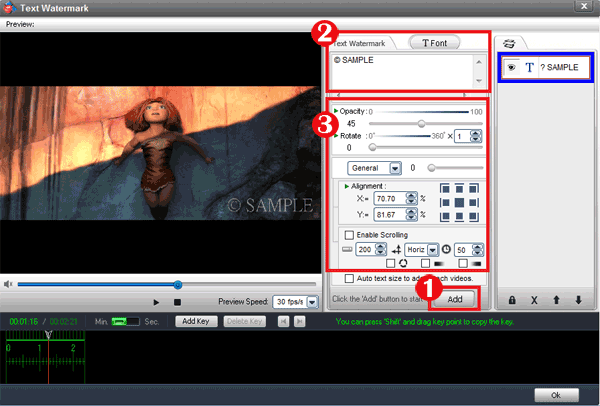
With its intuitive interface, you will feel extremely easy to finish text settings, the words will be displayed on output video(s).
Click "Add" button to add a text layer and start making text watermark.
Input words which you want. Adjust font and words effect settings.
Drag the words to arrange. Control the text's show time via time line editing; you can also create some animated effect for your words. Apply all of settings and go to next step.
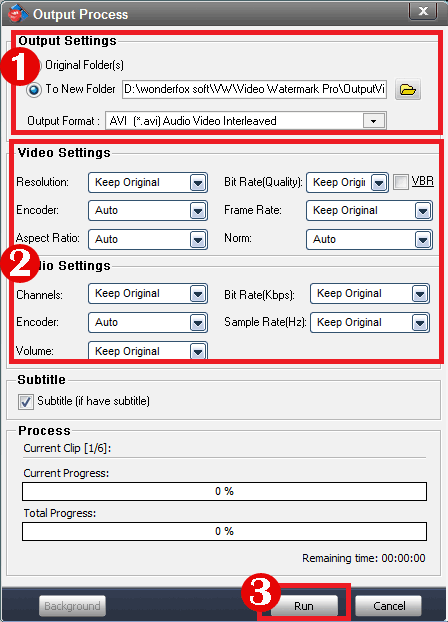
Output setting - Video Watermark Pro also a video encoding and converting software, set output video parameter, format and folder here. Click "Run" button to start output process.
You can download Video Watermark Pro for free trial without time limit, but unregistered edition will put DEMO words on output videos. So if you like this software please purchase license key. The license key will send to you in few minutes after you purchased. Have a free trial below: