
As we known, we cannot copy VHS tapes and rental DVDs for commercial purpose, the same goes to videos shared online. Before you upload videos to some sharing websites, it’s better for you to learn more about video copy protection and brand your videos first. A very efficient way is to add watermark on videos, like text watermark including copyright information, image, personal logo, etc. When people watch the video, they will find your information and know more about its original author.
If you are a movie publisher, video creator, etc, if you like to upload your original videos to sharing websites, say YouTube, My Space, FaceBook. I think you do not want to see that your videos may be unauthorized copying and used by others.
So video copy protection is necessary, because once you take actions to copyright your video, it will be more difficult for people to re-edit these videos without your consent. That means if somebody republishes your video in his name, visitors will also see your copyright information on videos. But keep in mind that there is no good way to prevent others from ever being able to copy your online videos unless you do not put them online.
Watermarking video is fairly a good way to help you protect videos, but how to do it? The following part will walk you through your problem. Keep reading.
When you want to add watermarks on your videos, the very first thing you need to do is to find a good software. But how to evaluate whether this video watermark software good or not? Here we list some points you need to think through when you choose one:
1, Allow you to edit text and put it to video.
2, Allow you to load your image or logo and put it to video.
3, Allow you to change output video format and video settings.
4, Allow you to adjust precise period of time the watermark displayed.
5, The interface should be easy to use so that there is no need for you to waste time to learn user guide.
Video Watermark (with two editions: Standard Edition and Professional Edition) is just the video watermark software will meet all your requirements. It allows you to embed text, image, logo, sign (include animated one) to your video in batch mode. With its easy to use interface, you will know exactly how to operate for the first time, you can do the task with few clicks, it is the best solution to protect and annotate your video.

Home edition: https://www.video-watermark.com/products/video-watermark.exe
Pro edition: https://www.video-watermark.com/products/video-watermark-pro.exe
Compare Difference Between Two Editions >>
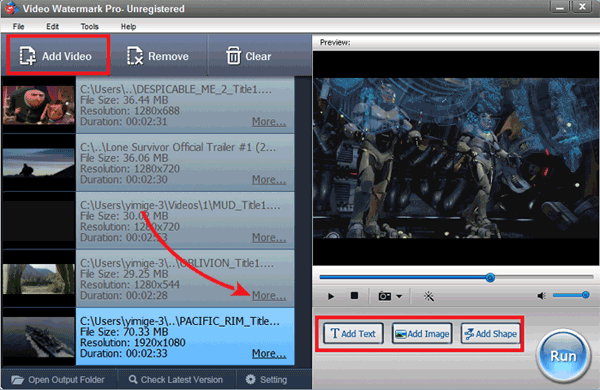
Download Video Watermark Pro first. Click 'Add Video' button to load video from your disc. Click 'Add Text' button to go to text watermark interface.
① Click the 'Add button' to create a text layer, all of settings base on the layer.
② Words - Input some words or symbols like © that you want
③ Font Setting - Click 'Font' button to go to Font Setting interface
④ Alignment - Drag your text to appropriate location in screen. Other settings (Opacity, Rotate)
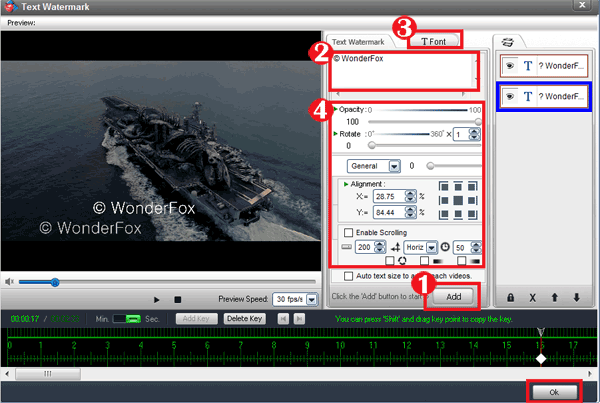
Tips: you can make some effects of text by Font settings.
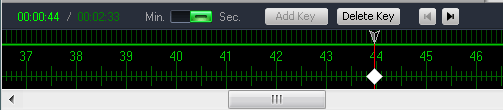
Key Point - Create key point to set a number of different text watermarks display at different time intervals. What’s more, you can create animation via two key points.
Create multi-layer to create multi text watermark in different time.
Click 'Ok' to go back to main interface.
Click 'Run' button to into output interface.
Select an output folder or keep original folder.
Select an output video format, we have most popular video formats includes AVI, MPEG, MP4, WMV, MKV, MOV, RM, 3GP, FLV, SWF, VCD, DVD.
Video settings - adjust video quality, video resolution, frame rate, video encoder, etc.
Audio settings - In most, you do not need make any changes.
Click 'Run' button to starting watermarking videos.
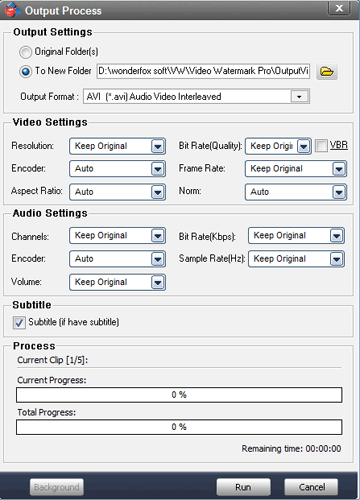
Tip: You can click 'Background' to minimize the window to tray icon.