
For video creator and movie publisher, put text overlay on video will help to declare the ownership of these videos and protect them. The copyright info and additional info will be displayed while others watch these copyrighted videos with text, which is really hard to remove from video.
Samples: see more samples please click here >>



At first, you need to download and install Video Watermark Pro to your PC, this video watermark software allows you to embed text, image (include animated) and logo to your video in batch mode. With its intuitive interface and fast processing speed, watermarking videos becomes very easy and fast.
Download Site: https://www.video-watermark.com/products/video-watermark.exe

(Now purchase Video Watermark Pro will get 50% off, from $69.95 to 34.95, Buy Now > )
After it has been installed, launch it.
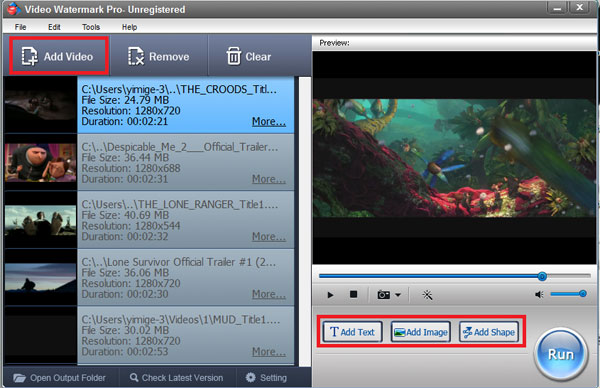
Click 'Add Videos' button to load video from your disc.
Click 'Add Text' button to jump to text watermark editing interface.
Step 2
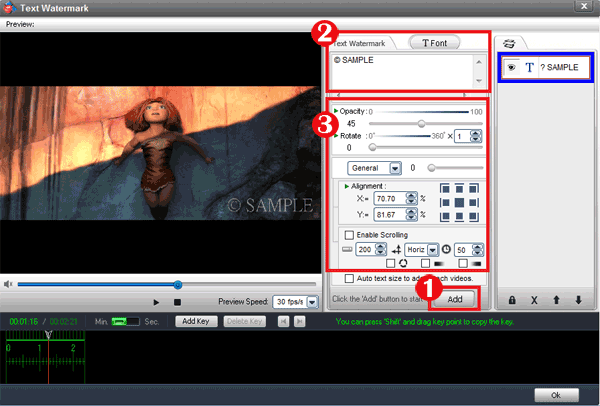
Click 'Add' button to create a text layer and start editing text watermark.
Type some text or symbols like © that you want.
You can click 'Font' button to edit more on Font Setting.
You can adjust opacity and rotate your text.
Drag your text to the position you want over videos.
Click 'Ok' button to return to main interface.
Tips: you can also make some effects on text on Font setting interface.
Step 3
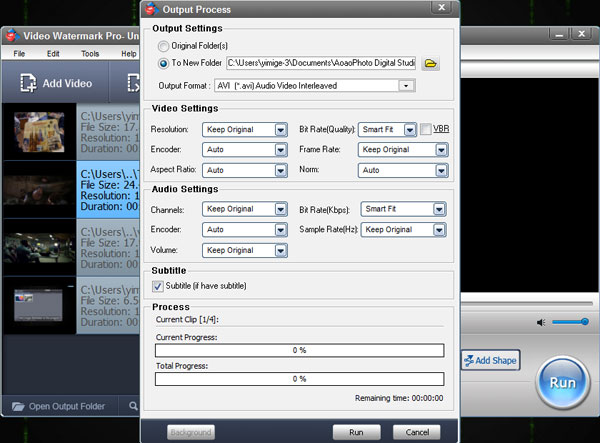
Click 'Run' button to go to output interface.
Select an output folder or keep original folder.
Select an output video format, we have most popular video formats includes AVI, MPEG, MP4, WMV, MKV, MOV, RM, 3GP, FLV, SWF, VCD, DVD.
Video settings - adjust video quality, video resolution, frame rate, video encoder, etc.
Audio settings - In most cases, you do not need make any changes.
Click 'Run' button to start watermarking videos.
Tip: you can click 'Background' to minimize the window and run the process on background.
Tips: you can make some effects of text by Font settings.